
Engineering Science · Interactive tool · Free
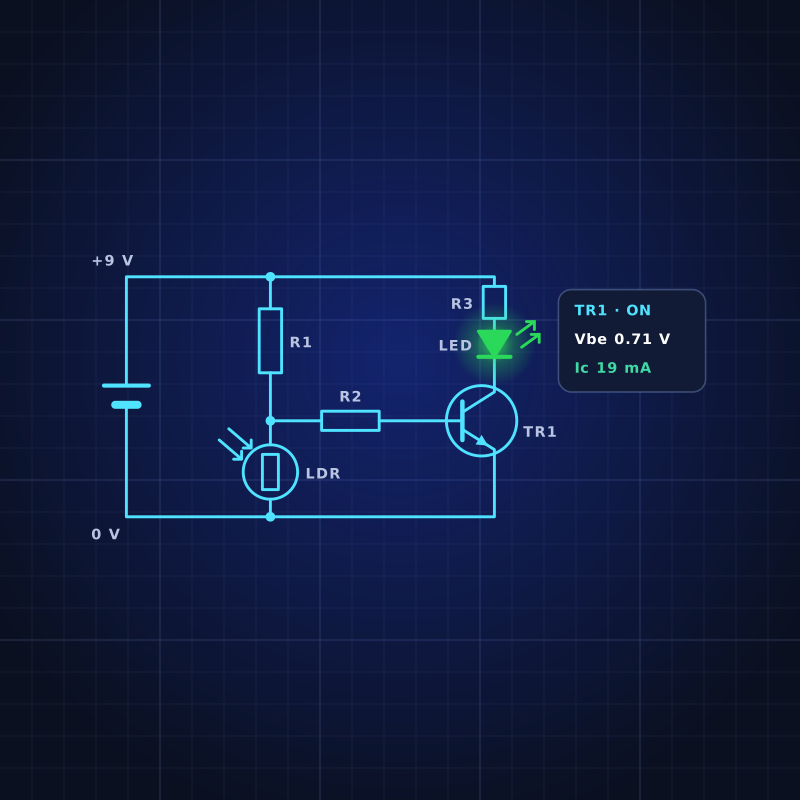
Build circuits on screen and watch them work. Drag in batteries, resistors, LEDs, sensors, transistors, logic gates and op-amps, join them with wires and take live readings. Push a part too far and it fails safely, then find out why and how to fix it.
SCALE 1:1
ESCircuitClass

SubjectEngineering Science
LevelBGE · N5 · Higher · AH
LicenceFree to use in class
SheetES · Tool · CircuitClass
01The simulator
Pick your level when it opens, then load an example circuit, open a saved project or start from scratch. BGE shows pictures of real parts. National 5, Higher and Advanced Higher use the circuit symbols you will meet in the exam. Not sure where to start? Open a ready-made circuit and follow its task card. Works best on a laptop or desktop in Chrome or Edge.
Engineering Science · BGE to Advanced Higher
CircuitClass by DesignClass. Drag parts onto the work pad, join them with wires and watch your circuit work. Push a part too far and it fails – then find out why and how to fix it. Nothing gets hot except the pixels.

Drag a part from the parts bin on the left (or tap it to add it here). Then drag from one connection point to another to add a wire.
Open a circuit, follow the task card, then change it and see what happens.
Build electronic circuits, switch them on and see what happens. Version 1.12.0
The circuit, component values, meter readings and warnings, plus any truth table, flowchart or code. Clear in black and white.
Leave them blank to write them on by hand. They are only used for this printout and are not saved.
The words and formulas you need for electronics, in plain English.
Drag a part from the parts bin onto the work pad, or tap it to drop it in the middle. The parts you see depend on the stage you pick.
Drag from one connection point (the small circles) to another, or tap one and then the other. Drop a wire onto another wire to make a junction.
Press Wire (or W). Click a connection point or any point on a wire to start, click empty space to add bends, then click a connection point or another wire to finish. Backspace removes the last bend.
Drag a part to move it. Select it, then use Rotate or Delete (or the R and Delete keys). Drag the middle of a wire to tidy it.
Click switches to turn them on and off. Hold push switches down. Select an LDR, thermistor, variable resistor or power supply to change the light, temperature, knob or voltage.
Select any part to see the voltage across it, the current through it and its power. Hover over (or tap) a wire to see its voltage. Turn on Voltages to label every wire.
A part that is pushed past its rating glows orange, then fails with a red mark. Select it to find out why and how to fix it, then press Replace. Reset repairs everything.
Your circuit is kept in this browser automatically. Use File to save it to a file, open it again later, or copy a link to send to your teacher. Use Exit full screen to go back to the page.
CircuitClass version 1.12.0 · by DesignClass
A layout for a real 830-hole breadboard, a parts list and the steps to build it.
Good to knowThe simulator uses the same rules you use in class – Ohm’s law, about 0.7 V to switch a transistor on, op-amps that saturate at about 85% of the supply – so your answers on paper and on screen should agree. Real parts vary a little, so a real circuit may not match exactly.

02What you’ll learn
There are 27 ready-made circuits, each with a task card: steps to follow, a “break it safely” challenge and questions that make you think like an engineer. The simulator uses the same rules you use in class, so your answers on paper and on screen should agree.
01
Series and parallel circuits, why an LED needs a resistor, fuses, motors, a doorbell and logic alarms. Measure voltage and current, and describe a system as input, process and output.
02
Ohm’s law, voltage dividers, light and temperature sensors, charging a capacitor, transistor and MOSFET switching, relays, Darlington pairs, time delays, logic gates and NAND equivalents.
03
Inverting and non-inverting amplifiers, op-amp comparators, 555 astable and monostable timers, the Wheatstone bridge and a binary counter.
03Keep building
Use the simulator alongside your Engineering Science course.
01
Energy, circuits and resistance, then solder a working torch.
Open BGE Electronics →
02
Electronics and control is a key part of National 5. Topics and past papers are here.
Open N5 Engineering Science →
03
Op-amps, sensors and the course assignment for S5–S6.
Open Higher Engineering Science →
“Wire it. Test it. Understand it.”
DesignClass CircuitClass